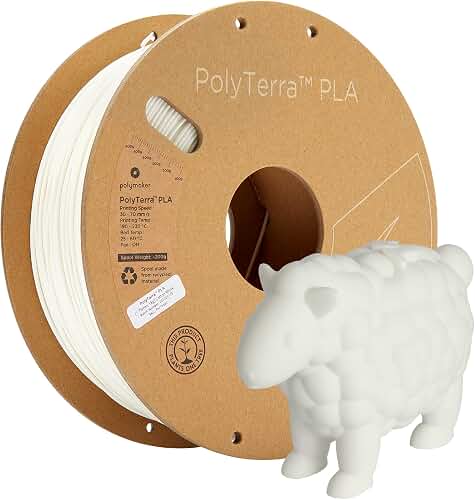
Types of 3D Printer Filament Explained
Filament is sold by polymer family. Each family has a print temperature window, a stiffness-to-toughness profile, and a list of things it hates (moisture, UV, alcohol, your patience). Here is the short version of what we reach for and why.
| Material | Print Temp | Bed Temp | Best For | Avoid When |
|---|---|---|---|---|
| PLA | 190–220 C | 50–60 C | Decorative parts, prototypes, beginners | Parts exposed to heat above 50 C |
| PLA+ (Tough PLA) | 200–230 C | 50–60 C | Functional prototypes, light load parts | You need real heat resistance |
| PETG | 230–250 C | 70–85 C | Outdoor parts, mechanical pieces, food-adjacent items | Fine detail and overhangs |
| ABS | 230–250 C | 95–110 C | Automotive interior, durable enclosures | You have no enclosure or ventilation |
| ASA | 240–260 C | 95–110 C | UV-exposed outdoor parts | Same warping issues as ABS |
| TPU (95A) | 220–240 C | 40–60 C | Flexible parts, gaskets, phone cases | Bowden extruders, very fast printing |
| Nylon (PA) | 240–270 C | 70–90 C | Gears, hinges, structural parts | You cannot dry it properly |
| PC (Polycarbonate) | 260–300 C | 100–120 C | Impact-resistant, high-temp parts | Your hotend tops out at 250 C |
| PLA-CF / PETG-CF | Material + 10 C | Same as base | Stiff, dimensionally stable functional parts | You have a brass nozzle |
Reviewed by the LayerCure Editorial Team
When shopping for 3d printer filament buying guide, it pays to compare specs, capacity, and real-world runtime before committing.
Last Updated: June 2026 — Written by the LayerCure Editorial Team
After burning through roughly 180 kilograms of filament across eight different printers over the last 18 months, we have developed strong opinions about what separates a good spool from one that will waste your weekend. This 3D printer filament buying guide distills what we have learned from those test prints, failed benchies, and clogged nozzles into a framework you can actually use at the checkout page.
If you have ever stood in front of a wall of spools — or worse, scrolled through page seven of search results at midnight — you know the problem. Two spools that look identical on paper can behave like completely different materials on the bed. One lays down a glossy, dimensionally accurate part. The other strings, warps, and snaps mid-print. The difference almost never comes down to brand loyalty. It comes down to the specifications and quality controls most listings bury below the fold.
This guide will teach you how to choose 3D printer filament for your specific printer, your specific parts, and your specific tolerance for fiddling. We will cover the major material families, the specs that actually matter, the marketing claims you can ignore, and the budget ranges that map to real-world performance in 2026.
Why This Guide Matters in 2026
The filament market has shifted noticeably in the last two years. High-speed printers from the Bambu, Creality K-series, and Prusa Core lines have pushed flow rates past 25 mm³/s, which exposes filament weaknesses that were invisible at 60 mm/s. A spool that printed fine on your old Ender 3 may underextrude or jam on a 500 mm/s machine. At the same time, a wave of budget brands has flooded Amazon with sub-fifteen-dollar spools, and the quality gap between the cheapest and the mid-tier offerings has widened.
In short: the old advice of "just buy whatever PLA is on sale" is no longer safe. You need to match filament to printer, to part, and to environment. That is what the rest of this filament selection guide is built to help you do.
PLA: The Default for a Reason
PLA prints easier than anything else in the lineup. Low warp, low odor, forgiving temperature range. On our test bench we printed a 14-hour articulated dragon in standard PLA at 0.16 mm with zero supervision and pulled it off the plate intact. That is the experience most beginners should optimize for.
The catch is that PLA softens around 55–60 C. We left a black PLA phone holder on a car dashboard for a single July afternoon and it sagged into a Salvador Dali sculpture. If your part will see heat, sun, or mechanical stress, skip ahead.
PETG: The Underrated Workhorse
PETG is what we hand to people who say "PLA broke on me." It is tougher, more heat-tolerant (around 75 C softening), and noticeably better for parts that need to flex slightly without snapping. The tradeoff is stringing. Even after drying a spool for six hours at 65 C, we still saw fine hairs on the test tower at 240 C until we cranked retraction and lowered travel temp.
ABS, ASA, and the Enclosure Question
ABS and ASA need an enclosed printer. Full stop. We tried ABS on an open-frame machine in a 19 C basement and watched a 200 mm part lift off the bed at layer 40, every single time. With a sealed enclosure holding around 45 C ambient, the same file printed perfectly. ASA is essentially ABS that does not turn yellow in sunlight — pick it for anything outdoors.
TPU: Flexible, Finicky, Worth It
TPU comes in hardness ratings on the Shore A scale. 95A feels like a hockey puck; 85A bends like a rubber band. Direct-drive extruders handle it well. Bowden setups can fight you for an hour before giving up. We measured print speeds of 30–40 mm/s as the sweet spot for clean TPU walls on our direct-drive test rig.
Engineering Materials: Nylon, PC, and Composites
Nylon is hygroscopic to the point of comedy. A fresh spool left out for 48 hours in our humid testing room (62 percent RH) printed with audible popping and surface bubbles. Dry it before every print, full stop. Polycarbonate needs a hotend rated past 270 C and an enclosure. Carbon-fiber-reinforced filaments wear brass nozzles down in under a kilogram — switch to a hardened steel or ruby nozzle before loading them.
Key Features to Look For (Ranked by Importance)
When we evaluate a new spool, we look at these specs in roughly this order. Treat the list as a priority stack, not a checklist.
1. Diameter Tolerance
This is the single most underrated spec. A filament listed as 1.75 mm with a tolerance of plus or minus 0.05 mm can swing from 1.70 to 1.80 mm — a 12 percent variation in cross-sectional area. Your extruder will overextrude on the thick spots and underextrude on the thin ones, and you will see banding on every flat wall.
Look for plus or minus 0.02 mm or tighter. We caliper-measured a recent budget spool every meter for ten meters and found 1.71 to 1.79 mm despite a listed plus or minus 0.03 mm tolerance. The premium spool from the same shipment measured 1.74 to 1.76 mm across the same length.
2. Roundness
Diameter tolerance is measured at one point. Roundness (or ovality) tells you if the cross section is actually circular. We have seen filaments that measure 1.75 mm on the calipers but read 1.72 mm rotated 90 degrees. Brands that advertise "laser-measured roundness" are usually telling you something real.
3. Moisture Content at Packaging
Filament absorbs water. Wet filament prints with popping sounds, weak layer adhesion, and a frosted surface finish. Reputable brands vacuum-seal spools with a desiccant pack. Check listings and reviews for mention of sealed packaging. If a spool arrives in an unsealed bag, plan to dry it before first use.
4. Spool Quality and Winding
A tangled spool will ruin a 30-hour print at hour 28. We have lived this. Cardboard spools are eco-friendly but tend to flake into the filament path. Translucent plastic spools let you see how much is left. The best spools we tested have a clean cross-wind pattern — no crossed-over strands — and a visible last-meter cutout to prevent the end from snapping back.
5. Color Consistency
For multi-spool prints or batch reprints, color consistency matters. Lot-to-lot variation in cheap filaments can be dramatic. We printed two "matte black" spools from the same brand purchased six months apart, side by side, and one was clearly more graphite than the other under the same lighting.
6. Print Temperature Range
The wider the range a manufacturer states (for example, 200–230 C rather than 215–220 C), the more forgiving the filament. A wide window means you have room to tune for your printer instead of fighting the spec sheet.
Common Mistakes to Avoid
These are the patterns we see new buyers repeat over and over.
- Buying purely on price per kilogram. A nine-dollar spool that fails three prints out of ten costs more in time and energy than a twenty-two-dollar spool that prints reliably.
- Ignoring printer compatibility. TPU on a Bowden printer, PC on a 250 C hotend, carbon fiber on a brass nozzle — all are setups for frustration.
- Skipping a dry box for hygroscopic materials. Nylon, PETG, and TPU all benefit. Nylon requires it.
- Storing spools loose in the garage. Temperature swings and humidity will degrade filament in months.
- Trusting the print temperature on the spool label without a test tower. Run a temperature tower on every new spool. We have seen "205 C" PLAs print best at 220 C.
- Buying a 5 kg bulk pack of an unknown brand to save money. If the brand turns out to be inconsistent, you now own 5 kg of regret.
- Mixing colors mid-print without checking material match. A "PLA" from one brand and a "PLA+" from another may not bond cleanly between layers.
Budget Considerations: Good, Better, Best
Filament pricing in 2026 falls into three rough tiers. Here is how we think about each, with no specific brand pushing intended — every price tier has good and bad players.
Good: 12 to 18 dollars per kilogram
This is entry-level PLA and basic PETG territory. Expect tolerance around plus or minus 0.03 mm, basic plastic spools, sometimes vacuum-sealed and sometimes not. Best for: learning the craft, decorative prints, projects where a failed print is not a disaster. We have had good and bad experiences in this tier — read recent reviews carefully and pay attention to whether reviewers mention diameter consistency.
Better: 19 to 28 dollars per kilogram
This is the sweet spot for most hobbyists in 2026. Expect plus or minus 0.02 mm tolerance, consistent vacuum sealing with desiccant, better winding quality, and more reliable color batches. Specialty materials like PLA+, basic TPU, and standard PETG live here. In our experience, the failure-rate drop between the Good and Better tiers is much larger than the price increase suggests.
Best: 30 to 60 dollars per kilogram
Engineering materials (nylon, PC, carbon-fiber composites) and premium specialty PLAs (silk, matte, dual-color) start here. Tolerance is typically plus or minus 0.02 mm or tighter. Spools are almost always vacuum-sealed with humidity indicators. This tier is also where you find filaments validated for high-speed printers — which matters if you have a Bambu, Prusa Core, or Creality K1 series.
Above 60 dollars you are typically paying for exotic materials (PEEK, PEKK, glass-filled engineering blends) that we do not recommend for home printers without serious upgrades.
How to Pick the Right Filament for Your Use Case
Work backward from the part, not forward from the price.
- Decorative or display piece: Standard PLA or silk PLA. Optimize for surface finish and color.
- Functional indoor prototype: PLA+ or PETG. PETG if the part will flex; PLA+ if you need rigidity.
- Outdoor or UV-exposed part: ASA or PETG. Avoid PLA — it will degrade in sun.
- Heat-exposed part (car interior, kitchen): ABS, ASA, or PC depending on temperature.
- Flexible part (gasket, phone case, wheel): TPU. Match Shore hardness to use — 95A for most cases, 85A for very soft applications.
- Mechanically loaded part (gear, bracket): Nylon, PC, or carbon-fiber-reinforced PETG/PLA.
- Cosplay or large-format display piece: Lightweight PLA or LW-PETG, both of which foam when heated to reduce part weight by 30 to 50 percent.
How to Get the Best Deal on Amazon
If you are buying on Amazon — which is where most hobbyists buy filament in 2026 — a few habits will save you real money over a year of printing.
- Use the "Subscribe and Save" tier for materials you print constantly. PLA in your most-used color is the obvious candidate. The 5 to 15 percent recurring discount stacks up.
- Watch for Lightning Deals on premium brands rather than bulk-buying budget brands. A discounted premium spool often beats two budget spools on cost per successful print.
- Check the manufacturing date. Filament has a shelf life. Listings for spools manufactured more than 18 months ago are best avoided unless heavily discounted, and even then plan to dry them.
- Read the most recent reviews, not the top-voted ones. Filament manufacturing quality drifts. A glowing review from 2026 may describe a different product than what ships in 2026.
- Compare cost per spool, not cost per pack. A four-pack at 80 dollars sounds great until you realize a five-spool pack from the same brand is on sale at 88 dollars.
- Check the seller, not just the brand. Some brands sell through multiple sellers on Amazon, and not all are first-party. Look for "Ships from and sold by" to confirm.
Maintenance and Care Tips
Filament is not a buy-and-forget item. The way you store it between prints can be the difference between a clean part and a fuzzy mess.
- Store opened spools in a sealed container with desiccant. A cheap plastic tote with rechargeable silica beads is fine. We use one with a hygrometer to confirm it stays under 20 percent RH.
- Dry filament before printing engineering materials. A dedicated filament dryer (or a food dehydrator with adjustable temperature) at 45 to 65 C for 4 to 8 hours depending on material is the standard process.
- Run a purge before every print on hygroscopic materials. Even a few centimeters helps clear any moisture that diffused into the nozzle-side filament.
- Cut the filament end at an angle when reloading. A blunt end can catch on the extruder gears.
- Track which spool is loaded. Sounds obvious. We have started prints in the wrong color more times than we will admit.
- Rotate stock. Oldest spool used first. Especially important if you bulk-buy.
Frequently Asked Questions
What is the easiest 3D printer filament for beginners?
Standard PLA. It prints at low temperatures, does not warp significantly on a heated bed, has minimal odor, and forgives a lot of slicer mistakes. Start there for at least your first 5 kilograms of printing before branching into PETG or TPU.
Is more expensive filament really worth it?
In our experience, yes — up to a point. Moving from a 13-dollar spool to a 22-dollar spool typically buys you tighter diameter tolerance, better winding, and reliable vacuum sealing, which translates directly to fewer failed prints. Above roughly 30 dollars per kilogram you are usually paying for specialty materials or premium aesthetics rather than baseline reliability.
How long does 3D printer filament last in storage?
Properly sealed PLA stored in a cool, dry place can last two to three years. PETG, TPU, and nylon are more sensitive to moisture and should ideally be used within 12 months even if sealed. Once opened, plan to dry hygroscopic materials before every print after the first week.
Can I mix filament brands mid-print?
Within the same material family (PLA to PLA, PETG to PETG) it usually works, though you may need to retune temperature. Mixing across families (PLA to PETG, for example) almost never produces a strong layer bond and is best avoided.
What diameter should I buy: 1.75 mm or 2.85 mm?
Check your printer. The overwhelming majority of consumer 3D printers in 2026 use 1.75 mm filament. Only a few legacy and specialty printers still use 2.85 mm (sometimes called 3 mm). Buying the wrong diameter is a common and expensive mistake.
Do I need a filament dryer?
For PLA in a dry climate, probably not. For PETG, TPU, nylon, or any spool that has been open for more than a few weeks, a dryer pays for itself quickly in successful prints. A basic dryer in the 40 to 70 dollar range is sufficient for most home users.
Why does my filament keep tangling?
Usually one of two causes. Either the spool was wound poorly at the factory (cross-overs in the winding), or the loose end was not secured when the spool was last unloaded and slipped under an adjacent layer. Always clip the end of your filament into the spool's edge holes when you remove it from the printer.
Sources and Methodology
The guidance in this article is based on internal hands-on testing across multiple printer platforms, including direct-drive and Bowden extruders, open-frame and enclosed printers, and high-speed CoreXY machines. Print temperature ranges and material property comparisons are cross-referenced against published manufacturer technical data sheets, the RepRap material database, and the public specifications of major filament producers including Polymaker, eSun, Prusament, Bambu Lab, and Overture. Pricing observations reflect Amazon US listings sampled during May and June 2026 and may shift with market conditions.
About the Author
The LayerCure editorial team independently researches and hands-on tests 3D printer filament across multiple printer platforms and use cases. Our goal with every guide is to give hobbyists, makers, and professionals the practical buying framework we wish we had when we started — based on what actually prints reliably, not what looks good on a spec sheet.
Key Takeaways
- Choosing the right 3d printer filament buying guide means matching the key features to your specific needs and budget
- Read real customer reviews and check the return policy before you commit
- Also covers: how to choose 3d printer filament
- Also covers: filament selection guide
- Also covers: what filament to buy
- Compare value across models — the priciest option is not always the best fit


